Inspect graphs and export diagrams
Every machine carries its definition as data: the states, the declared edges with everything each one declares, the policies, watches and sub-machine bindings. This page reads that data, queries its topology and exports it as a Graphviz diagram. None of it runs a guard, an action, a hook or a sub-machine's lookup.
Contents
- Read a definition
- A definition without collaborators
- Query the topology
- Export Graphviz DOT
- Export from the command line
- Diagrams and contracts in tests
Read a definition
Every facade exposes its definition:
GraphDefinition<Ticket, TicketState, TicketTransition> graph = tickets.definition();
System.out.println(graph);
System.out.println(tickets.transitionsFrom(TicketState.REVIEW));
System.out.println(graph.outgoingFrom(TicketState.REVIEW));
System.out.println(graph.findTransition(TicketState.REVIEW, TicketTransition.APPROVE));
System.out.println(graph.policy(TicketState.OPEN).reasonFor(TicketTransition.APPROVE));
toString() prints the machine's key and its counts, such as Ticket/TicketState[4 states, 6 transitions].
transitionsFrom returns the identifiers declared from a state, outgoingFrom the TransitionSpecs themselves,
transitions() every declared edge, ordered by origin, then identifier, then destination, automaticFrom the
automatic edges that leave a state, in the order an advance tries them, and findTransition the
single spec keyed by (from, id), as an Optional that is empty when no edge is declared. key(), initial(),
terminals() and hasAsync(), true when some edge is asynchronous, describe the machine as a whole.
A TransitionSpec is one edge: its endpoints and identifier, its kind(), ACTION or MOVE, its key(), the
TransitionKey (from, transition), which prints as FROM/TRANSITION, the ActionRef and GuardRefs that name its
action and guards, its onFailure, failsOn, recoveryRules(), timeout and afterCommit hook, and isAsync(),
true when the action or any guard is asynchronous. automatic() says the graph declares the edge
automatic, and onFailureContinues() that its onFailure route continues the chain of
automatic attempts; so does a RecoveryRule whose continueChain() is true. policy(state) is never null: a
StatePolicy holds the state's otherwise reason and its rejectionReasons() per identifier, and reasonFor(id)
picks the one a request gets. watch(state) returns the state's WatchSpec, with the peer machine's key and its
ordered WatchRules, each a named condition and the identifier it executes, and submachine(state) the
SubmachineSpec that binds a child, with its child() definition, childKey() and exits().
An ActionRef and a GuardRef are either Sync or Async records, with their name() and isAsync(); a HookRef
is a named hook that takes the entity and its CommitContext, which run(entity, context) calls, and
HookRef.of(name, consumer) adapts a hook that takes the entity alone.
A definition without collaborators
TicketsRuntime.graph(new TicketActions()) needs the collaborators the machine calls, and a companion whose machine
binds sub-machines also takes the definition of each of them. To read, test or draw the graph without any of them,
every machine's companion also declares structure():
GraphDefinition<Ticket, TicketState, TicketTransition> structure = TicketsRuntime.structure();structure() makes the very declarations graph(...) makes and takes nothing. It reads the definition of each
machine it binds as a sub-machine from the structure() of that machine's companion, once, as graph(...) binds the
one definition it is given. It binds no collaborator: an action, guard, hook or lookup that calls an instance member of
a class throws IllegalStateException when it runs, naming that class and the companion, as in
com.example.tickets.TicketsRuntime.structure() binds no com.example.tickets.TicketActions: build a machine from com.example.tickets.TicketsRuntime.graph(...). A static member, a property read, such as a watch's peers or a
sub-machine's child, and a built-in watch condition run as they do in graph(...). Building, reading or exporting the
definition runs none of them, so structure() answers every query on this page and draws exactly as graph(...) does.
Build the machines you run from graph(...) or from the generated set. An instance method of the facade, declared or
inherited, named structure and taking no parameter, would clash with this static method and is refused as
SG504.
Query the topology
graph() returns the DirectedGraph<S, T>, which keeps every declared state as a node and every edge as a
labelled edge, parallel edges included, and offers nodes(), edges(), outgoing(state) and incoming(state).
Its topology() is a Graph<S> that collapses parallel edges into one successor and answers structural
questions:
| Query | Answer |
|---|---|
successors(state) |
The states one declared edge away |
reachableFrom(state) |
The states some path reaches; the origin itself only when a cycle returns to it |
shortestPath(from, to) |
One shortest path, as the list of its states, or empty when there is none |
cycles() |
Every elementary cycle, each starting at its earliest declared state and without repeating it at the end |
inducedSubgraph(states) |
The graph restricted to those states |
A query on a state the graph does not hold throws IllegalArgumentException. outgoing and incoming return edges in
declaration order, and two DirectedEdges are equal only when their origin, label and destination all are.
Graph.nodes() returns the nodes in declared order and edges() the set of GraphEdge(from, to). Graph.of(nodes, edges) and
DirectedGraph.of(nodes, edges) build graphs of your own, from GraphEdge and DirectedEdge records: Graph.of
keeps the nodes in declared order with repeats collapsed, both throw NullPointerException for a null node and
IllegalArgumentException for an endpoint outside the nodes, and DirectedGraph.of also refuses a repeated node or a
repeated identical edge. StrongComponents.find(graph) returns their strongly
connected components, in the order of their first declared node, with cycleWitness(graph, component) naming one
cycle of a component; these are what the build uses to report an unauthorised cycle. The
testing guide asserts on the same queries through
assertThat(definition).topology().
Export Graphviz DOT
To export Graphviz DOT from an existing ticket facade:
import io.github.graphmaquina.export.GraphView;
import io.github.graphmaquina.export.GraphvizExporter;

String diagram = GraphvizExporter.render(GraphView.of(tickets.definition()));
System.out.println(diagram);
This is a fragment: put the imports at file scope and the statements inside a method. Export does not run transitions or evaluate guards, and there is no detail mode: the exporter draws the declared edges and no other, because an edge nobody declared does not exist.
The export is deterministic DOT text with LF line endings, drawn with the default theme. The diagram reads left to right under a title, the machine's name in bold at the top left. States are rounded boxes, the initial state has an incoming arrow from a solid dot, and a terminal state is a solid box with a double outline. Watches appear as notes connected by dashed lines.
Each edge label puts the identifier in bold on its first line. Below it, one per line in the theme's muted color, come
[auto] when the edge is automatic, or [auto n] when its state declares an order among two or more automatic
edges, with n counted from 1 in that order, then the action name, [async] when the action or any guard is
asynchronous, [if guard, …], one [recover Kind -> ID] per recovery rule in declaration order, [onFailure ID]
and any watch label. An automatic edge's arrow and identifier are drawn in the theme's automatic color. A route
that continues the chain ends its line with continues, as in [recover Kind -> ID continues] and
[onFailure ID continues]. Kind is the failure kind's binary name without its package, such as
PublicationFailures$Unavailable. The throwable types of failsOn and of the rules are not drawn, and a rule adds no
arrow. Parallel edges appear as separate arrows with different labels, and a self-loop is an arrow back to its own
node. A node's rejection policy is rendered as that node's tooltip — never as an arrow, because a refusal is an
answer the node gives and not a transition. State names and labels are escaped, and every declared state remains
visible even when no edge touches it. Edge labels and titles are Graphviz
HTML-like labels, in which &, <, > and " are written as
entities, so [recover Kind -> ID] reads [recover Kind -> ID] in the DOT text.
A state that holds a sub-machine is drawn as a cluster, a rounded, tinted region titled with the state and the child
machine, such as DEPOSIT: Payment/PaymentStatus with the state in bold, which holds the child's own diagram and has
the state's policy as its tooltip.
An edge into the state points at the child's initial state, or, when that state holds a sub-machine too, at that
one's initial state, and so on down. An exit is drawn once from each terminal state of the child that selects it,
without clipping at its source, and any other edge leaving the state, like the state's watch note, starts at the
cluster's border. A self-loop on the bound state that is not an exit is the exception: both its ends lie in the cluster, so
it is drawn unclipped from the cluster's invisible anchor to the child's initial state. The
DOT then sets compound=true and clips the arrows that cross a cluster's border with lhead and ltail. A graph
that binds no sub-machine has no cluster.
The shop's order machine exports as:
digraph "Order/OrderStatus" {
    graph [rankdir=LR, bgcolor="#ffffff", pad="0.3", nodesep="0.45", ranksep="0.7", fontname=Helvetica, fontsize=12, fontcolor="#1b1f3a", labelloc=t, labeljust=l, label=<<b>Order/OrderStatus</b>>];
    node [shape=box, style="rounded,filled", color="#1b1f3a", fillcolor="#ffffff", fontcolor="#1b1f3a", fontname=Helvetica, fontsize=12, penwidth=1.2, margin="0.18,0.06"];
    edge [color="#4f5677", fontcolor="#1b1f3a", fontname=Helvetica, fontsize=10, penwidth=1.1, arrowsize=0.7];
    initial [shape=point, width=0.14, height=0.14, fillcolor="#1b1f3a", label=""];
    n0 [label="NEW", tooltip="otherwise: cannot ship without payment"];
    n1 [label="PAID", tooltip="otherwise: money was charged: requires a refund"];
    n2 [label="PAYMENT_DECLINED", tooltip="otherwise: go back to NEW to retry the charge"];
    n3 [label="SHIPPED", peripheries=2, fillcolor="#1b1f3a", fontcolor="#ffffff", tooltip="otherwise: a shipment cannot be undone"];
    n4 [label="CANCELLED", peripheries=2, fillcolor="#1b1f3a", fontcolor="#ffffff", tooltip="otherwise: cancelled is final"];
    initial -> n0;
    n0 -> n1 [label=<<b>PAY</b><br align="left"/><font color="#4f5677">pay<br align="left"/>[async]<br align="left"/>[if retryBudgetLeft]<br align="left"/>[onFailure PAYMENT_DECLINED]<br align="left"/></font>>];
    n0 -> n4 [label=<<b>CANCEL</b><br align="left"/><font color="#4f5677">cancel<br align="left"/></font>>];
    n0 -> n2 [label=<<b>PAYMENT_DECLINED</b>>];
    n1 -> n3 [label=<<b>SHIP</b><br align="left"/><font color="#4f5677">ship<br align="left"/>[if allItemsPacked]<br align="left"/>[watches Item: allIn PACKED]<br align="left"/></font>>];
    n2 -> n0 [label=<<b>RETRY</b><br align="left"/><font color="#4f5677">[if retryBudgetLeft]<br align="left"/></font>>];
    n2 -> n4 [label=<<b>CANCEL</b><br align="left"/><font color="#4f5677">cancel<br align="left"/></font>>];
    watch0 [shape=note, style=filled, color="#a85a00", fillcolor="#fff6e5", fontcolor="#a85a00", label="watches Item"];
    n1 -> watch0 [style=dashed, arrowhead=none, color="#a85a00"];
}
Save the result as UTF-8 in tickets.dot, then use an installed Graphviz
to render an image:
dot -Tsvg tickets.dot -o tickets.svg
dot -Tpng tickets.dot -o tickets.png
The Java exporter needs no external library or native executable. Image rendering is a separate step. To have the
build write these files for every machine instead, see Export from the command line.
The text is set in Helvetica, a font Graphviz knows by name: it sizes each box with Helvetica's widths even in a build
without a font library, such as a browser-based renderer, and writes the font of SVG text as Helvetica,sans-Serif, so
a viewer without Helvetica shows its own sans-serif font, Arial on Windows.
GraphView.of(definition) is a public record of what the exporter draws, as text: name(), initial(),
terminals(), states(), transitions(), policies(), watches() and submachines(), so a renderer of your own
can read the same data, and its public constructors build a view by hand. States come in node order, edges in definition order, rules and exits in declaration order,
with one policy per state, and each SubmachineView carries the child's whole GraphView. A TransitionView holds the
edge's endpoints, identifier, kind, action, guards, whether it is asynchronous, its onFailure, its rendered watch rule
and its recovery rules, whether it is automatic, its automaticPosition in the order of its state when that
state declares one, and whether its onFailure route continues (failureContinues); a RecoveryView the failure
kind and the failsOn types as binary names, the recovery identifier and whether the rule continues; a PolicyView the state, its otherwise reason and its rejections rendered as ID: reason; and a
WatchView the state, the simple name of the peer's entity class and the rendered rules. The DOT text starts with
digraph "<name>" and the graph, node and edge statements that hold the layout, rankdir=LR among it, the
title, the fonts and the colors every element shares. Inside a cluster, node ids carry the prefix s<j>_, one per nesting level, where
j counts the view's bound states in node order. An edge that a watch rule executes gets
[watches <peer entity>: <condition names>] in its label, and the note reads watches <peer entity>. A
SubmachineView holds the bound state, the child's GraphView and its exits, each child terminal mapped to the
parent identifier it selects, in the given order.
You can also build a definition directly through TicketsRuntime.graph(new TicketActions()) without constructing a
running set, or through TicketsRuntime.structure() without any collaborator.
Change the colors
GraphvizExporter.render(view) draws with GraphvizTheme.defaults(), the light palette of graphmaquina.dev. A theme
is nine colors, one per role. Pass your own to render(view, theme):
import io.github.graphmaquina.export.GraphView;
import io.github.graphmaquina.export.GraphvizExporter;
import io.github.graphmaquina.export.GraphvizTheme;

GraphvizTheme dark = GraphvizTheme.defaults()
        .withCanvas("#1b1f3a")
        .withInk("#f3f4fb")
        .withMuted("#b8bedb")
        .withStateFill("#222747")
        .withAutomatic("#8bb6ff")
        .withClusterFill("#242a4b")
        .withClusterBorder("#3a416a")
        .withWatch("#ffcf8a")
        .withWatchFill("#2b2a45");
String diagram = GraphvizExporter.render(GraphView.of(tickets.definition()), dark);
This is a fragment, like the one above. Each with method returns a copy with that one role changed, so change only
the roles you need. A color is #RRGGBB or #RRGGBBAA in hexadecimal, in either case; an alpha of 00 makes the
role transparent, such as withCanvas("#ffffff00") for a diagram with no background. Any other value throws
IllegalArgumentException naming the role, and null throws NullPointerException.
| Role | Default | What it colors |
|---|---|---|
canvas |
#ffffff |
the background |
ink |
#1b1f3a |
state names and outlines, the initial dot, the fill of terminal states, edge identifiers and titles |
muted |
#4f5677 |
the arrows of edges that are not automatic and the initial arrow, the text under an edge identifier, and the child machine in a sub-machine's title |
stateFill |
#ffffff |
the body of a state that is not terminal, and the names written on terminal states |
automatic |
#2457d6 |
the arrow and identifier of an automatic edge |
clusterFill |
#f5f6fb |
the body of the region that holds a sub-machine |
clusterBorder |
#d4d8ea |
the outline of that region |
watch |
#a85a00 |
the outline and text of a watch note, and its dashed line |
watchFill |
#fff6e5 |
the body of a watch note |
A terminal state is filled with ink and written in stateFill, the reverse of the other states, so keep stateFill
opaque: a transparent one would hide the names of terminal states. The double outline marks a terminal state even
where the colors do not.
A theme changes colors only: the states, edges, labels, fonts, sizes and layout are the same in every theme.
Export from the command line and GraphGoldens always draw with the defaults.
Export from the command line
Both build adapters write the diagram of every machine a compilation declares, with no code of yours: they compile
the source set, draw each machine through its companion's structure() and write
one DOT file per machine, holding exactly what GraphvizExporter.render(GraphView.of(...)) returns for it.
With Gradle:
./gradlew exportStateGraphDot
./gradlew exportTestStateGraphDot
exportStateGraphDot exports the machines of main, exportTestStateGraphDot those of test, and
export<SourceSet>StateGraphDot those of any other source set. Each task runs after the compilation of its source set
and writes into build/graphmaquina/<sourceSet>/dot, which its outputDirectory property moves. A source set that
declares no StateGraph processor skips its task, as it skips its generation, and the task is up to date while its
inputs, the source set's runtime classpath and its compiled classes among them, and its output directory do not
change.
With Maven:
mvn graphmaquina:export-dot
mvn graphmaquina:export-dot-test
export-dot exports the machines of the main compilation into target/graphmaquina/main/dot, and export-dot-test
those of the test compilation into target/graphmaquina/test/dot. Neither goal is bound to a phase: each forks the
default lifecycle up to compile, or test-compile, so the goal alone generates, compiles and completes that
compilation first, and there is no need to run compile before it. Each does nothing where the
other goals do nothing, and for a compilation that publishes no StateGraph index.
Maven resolves the graphmaquina: prefix only in a project that declares the plugin. In a multi-module build where
some modules do not declare it, run the goal from the parent by the plugin's coordinates,
mvn io.github.graphmaquina:graphmaquina-maven-plugin:<version>:export-dot: every module resolves them, and each
module whose compilation publishes no index is skipped.
What every export writes:
- One file per machine of the compilation, named after the qualified name of its facade, such as
com.example.tickets.Tickets.dot, in UTF-8 with LF line endings. The path of each file written is printed. - The directory belongs to the export: before writing, it removes the
.dotfiles directly in it, so a machine you renamed or removed leaves no diagram behind. Nothing else there is touched. - A machine bound as a sub-machine is drawn as a cluster in its parent's diagram, a machine of another module or jar included, and has a file of its own in the export of the compilation that declares it.
- Only machines declared with
@GenerateGraphApihave a companion, so only they are exported. Draw a graph built with the programmatic DSL withGraphvizExporterin code, as above; a set has no graph of its own. - Every diagram is drawn with the default theme; the build takes no colors. To draw with
other colors, call
GraphvizExporter.render(view, theme)in code.
The machines are loaded by the generator, in a JVM of its own, over the runtime classpath of the compilation, and
drawn with the graphmaquina-core that classpath holds. Loading a companion initializes it and the enums its graph
names; no action, guard, hook or lookup runs. A companion that cannot be loaded or drawn, such as one whose machine's
enum throws while it initializes, fails the export, naming the machine and the cause, and nothing is written. Then
render the files you need:
dot -Tsvg build/graphmaquina/main/dot/com.example.tickets.Tickets.dot -o tickets.svgDiagrams and contracts in tests
Use typed assertions on GraphDefinition and its TransitionSpecs, or GraphSnapshots with .graph
resources, for structural contracts. Validate behavior through real operations, outcomes, reactions and
observed entity states. A graphical export is never an oracle for machine logic. GraphGoldens with .dot
resources checks visual output only; keep those tests separate from contract and behavior tests. The
testing guide describes both APIs and their Gradle and
Maven update configuration.
The illustrated ticket workflow summarizes the quickstart's edges. The exporter produces its own labels from the definition. The repository keeps exact expected exports in the example's golden diagrams.
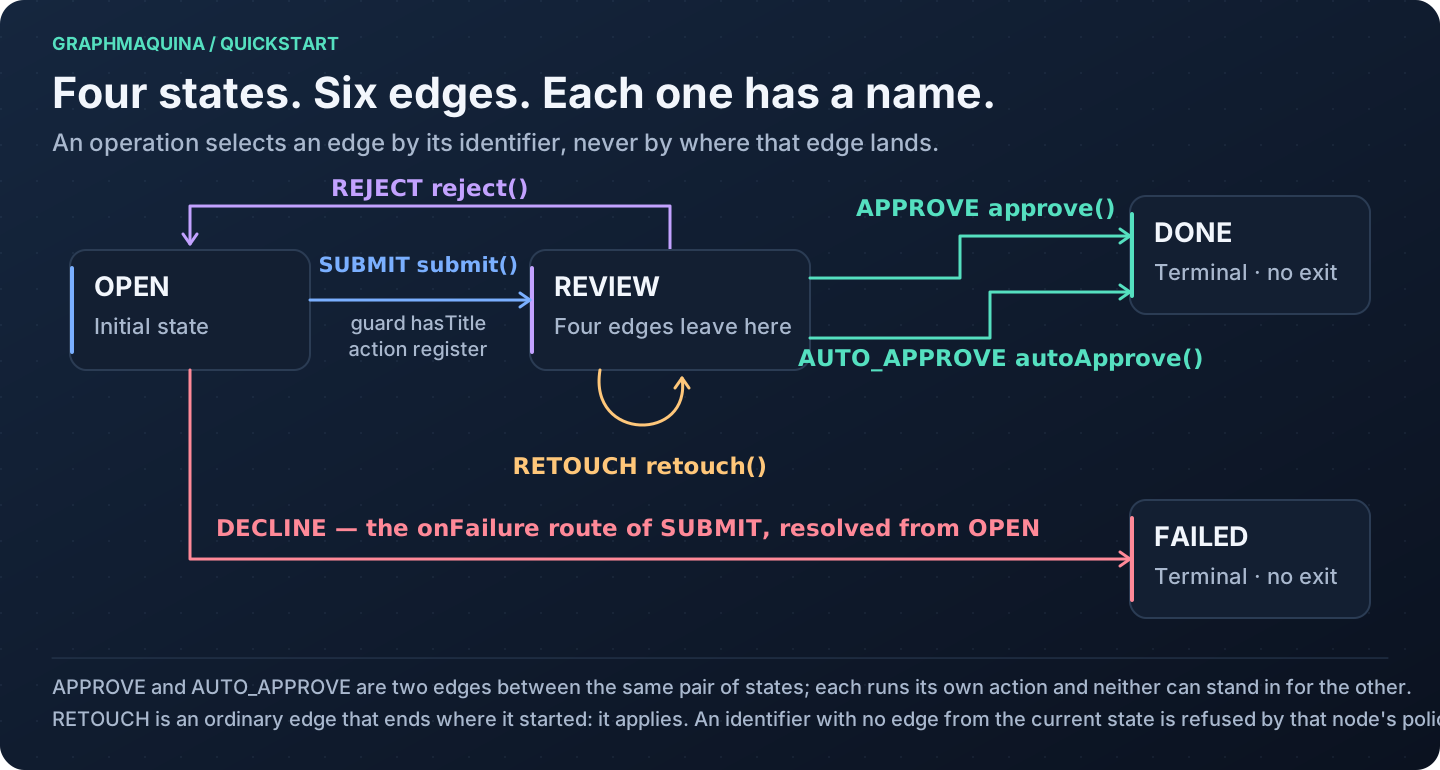
The illustrations in this guide are maintained separately from the Graphviz exporter. Their accessible SVG sources, with a table of what each one shows, are in docs/images.
Next: Diagnostics and troubleshooting. Back to the documentation index.